Apps
Five apps. Each does exactly one thing. That one thing, properly.
If you click around other indie sites, you usually land on a roadmap with twelve checkpoints and a "coming soon" for version 4.0. Not here.
What's finished is listed below. What we're working on is invisible. It ships when it's ready.
Mirino
As little app as a scanner needs.
Buy once, done. Will work the same five years from now.


Specs
- Platform
- iOS · iPadOS · macOS
- Languages
- 12 (DE, EN, FR, ES, IT, NL, PL, PT-BR, KO, JA, ZH, TR)
- Price
- €4.99 one-time
- Model
- One-time purchase
- Data
- 100% local
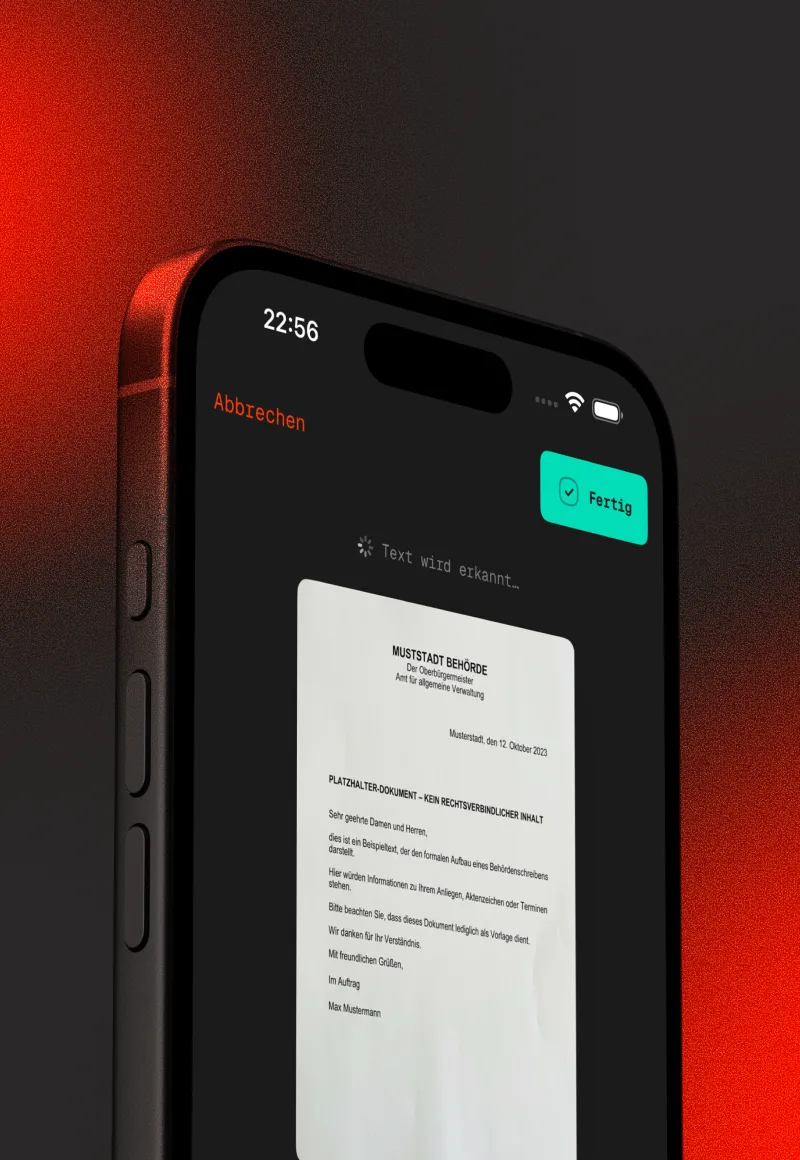
You put a sheet on the table, hold your iPhone over it, done. Mirino detects the edges, corrects perspective, exports a PDF.
The whole thing runs on your device — no server, no account, no sync, no cloud storage that someone has to pay for somewhere. A scanner doesn't need a server, so we don't build one.
What Mirino does
-
100% local
Scans stay on your device. No server. No account. No cloud that someone has to pay for somewhere.
-
Mac as companion
The small Mac app shows every new scan automatically. Edit, print, file — without the AirDrop dance.
-
Smart titles
On iOS 26+ Apple's on-device foundation model suggests sensible titles. Local, no cloud request.
-
Searchable PDF · 12 languages
OCR makes every scan searchable. Works in twelve languages, fully on-device.
-
Word export
Need the text editable? Mirino exports to DOCX, without a round-trip through a cloud.
-
Signature
Sign with finger or Apple Pencil, straight onto the scan. No extra app.
-
Password-protected
Sensitive documents leave your device encrypted. PDF standard, any reader can open them.
-
iCloud sync (opt-in)
If you want it: your scans across all devices. Apple's cloud, no third party. If not: everything stays local.
What Mirino does not do
-
No subscription
€4.99 once. Will work the same five years from now.
-
No account
No sign-up, no email verification, no profile.
-
No server
We don't have one. There's nothing we could lose.
-
No tracking
No analytics, no telemetry, no crash reporter that phones home.
-
No ads
Ever. Not even "subtle" or "with partners".
-
No cross-sell
No "Pro version", no upgrade pop-ups, no bundles.
Quitto
For everything between a receipt and the tax office.
Three receipts free. After that subscription or lifetime — your call.
Specs
- Platform
- iOS · iPadOS
- Languages
- 6 (DE, EN, FR, ES, JA, ZH)
- Price
- from €2.99/mo · lifetime €49.99
- Model
- Free tier · subscription · lifetime
- Data
- OCR local · sync iCloud
You photograph a receipt. Quitto reads the date, amount, VAT rate and vendor, files it under the right category and keeps the whole collection in sync across your devices.
At year-end an export drops out that your tax advisor or the German ELSTER form can directly work with. Because OCR and sync produce ongoing costs, there is a subscription. Lifetime is also fine.
What Quitto does
-
On-device OCR
Date, amount, VAT rate, vendor — all read from the receipt photo, locally. No API, no cloud request.
-
Native e-invoice support
XRechnung XML and ZUGFeRD PDF are parsed directly — no OCR needed, fully structured. Mandatory in German B2B from 2025.
-
DATEV + advisor package
One click: a ZIP with DATEV CSV (SKR03), receipt images and an EÜR summary. Straight to your tax advisor.
-
EÜR line mapping
Every category mapped to the right EÜR line (14–56). No manual sorting at year-end.
-
GoBD audit trail
Every change to a receipt is logged with a reason. Tax-office-ready.
-
iCloud sync (opt-in)
Your Apple cloud, optional. No third party, no Quitto-owned cloud.
-
Multi-currency
Original amount and exchange rate are kept. Travel receipts without conversion drama.
-
Lifetime purchase
If you don't want the subscription: €49.99 once, done.
What Quitto does not do
-
No own cloud
Only your iCloud, optional. We have no Quitto server that ever sees your receipts.
-
No tracking
No analytics, no telemetry. What you do in Quitto, we don't see.
-
No ads
Ever. No "recommendations" for tax-software partners either.
-
No data sharing
Only what you deliberately export goes to your tax advisor.
-
No vendor lock-in
DATEV standard, exportable. Switch tools and your data comes along.
-
No newsletter
You write to us. We don't write to you uninvited.
Tasto
Finder keys, the way your fingers expect them.
The Finder keys are free, forever. Tasto Pro unlocks two Windows extras — €3.99, once.


Specs
- Platform
- macOS 14+
- Languages
- 6 (EN, DE, FR, ES, JA, ZH)
- Price
- Free · Pro €3.99 one-time
- Model
- Direct download (.dmg) · free base + Pro
- Data
- None — nothing gets sent
You hit Return and the Finder wants to rename. Forward delete does nothing. If you come from Windows, you've been tripping over this for years. Tasto flips it: Return opens the selection, Delete moves it to the trash, ⌘Return renames.
Tasto sits in the menu bar and only steps in while the Finder is frontmost. If you're renaming or searching, every key passes through unchanged — Tasto checks via the accessibility interface, on every keystroke.
What Tasto does
-
Return opens
Selection highlighted, Return pressed, file open. The way every file dialog, every browser and every other system does it.
-
Delete cleans up
Delete and fn⌫ move the selection to the trash. No ⌘⌫ finger gymnastics.
-
Renaming stays renaming
Text field focused, dialog open? Tasto notices and leaves the keys alone. Searching and renaming keep working as always.
-
⌘Return renames
Renaming isn't gone, it just moved. Optional, like every mapping.
-
Every mapping toggleable
Only swap Return? Only Delete? You decide what Tasto touches.
-
Pause in the menu
One click, Tasto holds still. Another one, it carries on.
-
Menu bar, no Dock
A quiet item in the top right. No window, no Dock icon.
-
macOS 14 to 27
Built for current Macs, verified up to macOS 27. In six languages.
What Tasto does not do
-
No tracking
No analytics, no telemetry, nothing gets sent. The only network request is a daily update check without any user data — and you can turn it off.
-
No forced purchase
The Finder keys are free, forever. Tasto Pro (€3.99, one-time) unlocks two extras — voluntary, no subscription.
-
No App Store
The app sandbox forbids intercepting keystrokes. Hence a direct download as .dmg.
-
No account
Download, open, grant the permission, done.
-
No ads
Ever. Not even in a free app.
-
No key logging
Tasto only reacts while the Finder is frontmost. Whatever else you type is none of Tasto's business.
Stacco
Pull yourself a note.
€6.99 once. No subscription. Ever.
Specs
- Platform
- macOS 14+
- Languages
- 12 (DE, EN, FR, ES, IT, NL, PL, PT-BR, KO, JA, ZH, TR)
- Price
- €6.99 one-time
- Model
- One-time purchase
- Data
- 100% local
Stacco lives in your menu bar. Pull the icon — a note falls out and sticks where you drop it. Push it back when it's done.
Eight paper colours, real shadows, a history per note. No AI, no account, no network code — your notes stay on your Mac.
What Stacco does
-
Pull instead of click
Pull the menu-bar icon, a note falls out and sticks where you drop it. Push it back when it's done.
-
Eight paper colours
Real shadows, a history per note. Notes that look like paper — not windows.
-
Rich text · Markdown export
Headings, checklists, numbered lists. Export turns it into clean Markdown.
-
Every note pinnable
One click, the note stays on top. One more, it falls back into line.
-
12 languages
Fully localized, from German to Japanese.
-
Menu bar, no Dock
A quiet dot in the top right. No window, no Dock icon.
-
Native for the Mac
No Electron, no web wrapper. Starts instantly.
-
100% local
No network code in the app. There's nothing that could carry your notes away.
What Stacco does not do
-
No subscription
€6.99 once, done. A note isn't a service — so it doesn't cost monthly either.
-
No AI
Stacco doesn't summarize, suggest, or read along. It's paper.
-
No server
We don't have one. Your notes exist exactly once: on your Mac.
-
No account
Install, pull, write. Done.
-
No tracking
No analytics, no telemetry.
-
No ads
Never. Not even on a sticky note.
Piuma
Makes copy-paste from ChatGPT & Co. clean again.
Free at the core. Piuma Pro: €4.99 — once.
Specs
- Platform
- macOS 14+
- Languages
- 6 (DE, EN, FR, ES, JA, ZH)
- Price
- Free · Pro €4.99 one-time
- Model
- Free base + Pro one-time purchase
- Data
- 100% local, offline
Piuma is a quiet note pad in the menu bar that kills formatting: text in, plain out. A hotkey cleans the clipboard, Markdown clutter from AI chats turns readable — and when you copy out, you choose: plain, Markdown or formatted.
Not a single network call — verify it with Little Snitch. The core is free. Piuma Pro costs €4.99, once.
What Piuma does
-
Clean the clipboard
One hotkey, and formatted chaos becomes clean text. Fonts, colours, invisible characters — all gone.
-
Markdown turns readable
Asterisks, hashes, backticks from AI chats — Piuma renders them as readable text instead of carrying them along.
-
One quiet pad
A text field in the menu bar. Always there, never in the way — for the paragraph that needs to park for a second.
-
Three ways out
When you copy out, you choose: plain, Markdown or formatted. Depending on where the text needs to go.
-
Menu bar, no Dock
A quiet dot in the top right, reachable by hotkey.
-
6 languages
DE, EN, FR, ES, JA, ZH — fully localized.
-
Native for the Mac
No Electron, no web wrapper. Starts instantly.
-
Free at the core
The pad and format-cleaning cost nothing. Piuma Pro unlocks the extras — €4.99, once.
What Piuma does not do
-
Not a single network call
Piuma has no network code. Verify it yourself — Little Snitch shows: nothing.
-
No subscription
Pro costs €4.99 — once. A clipboard isn't a service.
-
No AI
Piuma doesn't read your text or suggest anything. It only tidies up.
-
No account
Install, press the hotkey, done.
-
No tracking
No analytics, no telemetry.
-
No ads
Never. Not even in the free version.
Every name tells you what the app does.
Mirino is Italian for viewfinder: the little window you aim through before the click. That’s all a scanner needs.
Quitto is shaped from the German quittieren — signing off a receipt, done. The Italian ending turns it into a promise: short, round, settled.
Stacco is Italian for the act of peeling off: the moment you pull a note from the pad. And yes — there’s a stack in it, too.
Piuma is Italian for feather: the one you write with, and the one that weighs nothing. Exactly how text should feel.
Tasto is Italian for key. One key, one grip, done — it doesn’t need more interface than that.
More apps will come. Slowly. Not often.
When one is finished, it shows up here. Not before. We don't promise a quarter, a date, or a beta list you can sign up to so you get a push notification when it's ready.
If you want to know what we're working on, read the manifest — it explains why hyperzero is so slow that it ends up feeling fast.